quinta-feira, fevereiro 23, 2017

Scratch 2 in Fedora

My 8yo son started to have what he calls "Robotic Lessons" at school, which is not actually robotics yet, but introduction to programming using Scratch.

The first time I heard about it I though it was great because I though Scratch was Linux compatible, due to it comes installed by default in Raspbian. However I was disappointed to know that it was not like that.

Fedora has Scratch 1.4 in the repos which is not the version he's using at school, so I tried to find information about how to install the new version. The problem is that the version 2 run in Adobe Air and despite it says that it runs on Linux, it's not all distros.

So, after a few attempts trying to understand what was missing to run in Fedora, I gave it up, installed wine and the Windows version of those products. It simply worked!

This would be a great candidate for flatpak or snap.

segunda-feira, outubro 19, 2015

CoyoteTM 0.8 - Match Your Desktop

Is this the last version? Not sure yet! Is it stable? I hope so - for my usage, it seems fine, please prove me wrong!

The nicest thing in this version are the four color schemes added. The idea is to match your desktop theme. I know, I know, four is a low number, but if you use the default Gnome or Unity themes, you are covered. If you use Numix theme, you should be fine too and there is the now old dark theme as well. Enjoy!


Here is the complete ChangeLog:
  • Fixed compilation warnings when including xpm files;
  • Removed borders from all menubar and toolbar buttons;
  • Added code to persist chosen color scheme and selected show all tasks option across sessions;
  • Added 4 color schemes, 2 light (the default based on Adwaita palette and another one based on Ambiance palette) and 2 dark (the previous dark one and the new one based on Numix palette);
  • Added read-only mode for notes fields, so use can select text. Before it was not possible;
  • Cancel pending work code refactoring done.
 You already know the link!

sexta-feira, setembro 04, 2015

CoyoteTM 0.7 - Lots of Fun

I was not expecting this but CoyoteTM have got to version 0.7 - huge number.
There are lots of changes in the code. I don't split between bugfix and enhancements, so here is a narrowed list of changes - check ChangeLog for more:
  • Changed window icon handling supporting fltk version distributed in Ubuntu among others;
  • Improved keyboard handling for list views;
  • Added window button for common usage functions;
  • Improved messages; and
  • much more.
 So, reach out CoyoteTM download page and Godspeed!

terça-feira, julho 14, 2015

CoyoteTM 0.6 - small improvements

Another day and another batch of changes - most fixes:
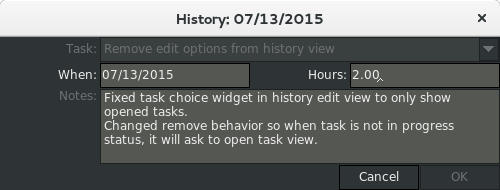
  • Added a task combobox in history view, so you'll know which task that history is refering too;
  • Changed remove button in history view to only remove history of tasks in progress. It will ask to open the task view otherwise;
  • Small fix to some parts where CoyoteTM was displaying Coyote TM;
  • Fixed spacing between menus and shortcuts; and
  • Merged canceled and completed view menu checkboxes to only "show all" now.
As usual, you can download it from sourceforge.
Enjoy!
History view now shows which task you are working on
You just have to ask

segunda-feira, julho 13, 2015

CoyoteTM 0.5 - now with history view

The last missing feature was finally added: history view. I don't know yet how things are going to be from now on because this is basically the end of what I was wishing for this application (ok, there is the gtk port yet... maybe).
Everything now is a big WHAT IF:
  • what if I port it to gtk?
  • what if I start to use sqlite?
  • what if I consolidate task / project / person and now history in only one main window?
  • what if I connect it to cloud services (dropbox, gdrive, box,...)?
While I'm thinking about that, other projects are just too late to start: a project management and a small business inventory / order management. They are all much bigger than this one and I hope to be able to dedicate more time to these things which means less series and movies and more coffee and code.

Ok, going back to CoyoteTM, this versions adds more than just the history view, here is a short list:
  • Fixed task list view buggy multiselection by dropping FL_DRAG event
  • Changed task list view sort to sort by category and then sort by status
  • Changed don't start task behaviour to open history but in read-only mode
  • Added read-only mode for task edit window when status is: ON HOLD, COMPLETED or CANCELED
  • Added history view
  • Added desktop file for DE integration, besides application icons
  • Improved about window
  • Added --version command line parameter
Get it while it is still fresh @ Sourceforge.
Finally, we can't miss a screenshot or two:
Glimpse of the new features: application icon, history view and new about window
Detail of the new history view
Oh, where am I running this gourgeus application? Fedora 22 with Gnome 3.16, thank you very much!

terça-feira, junho 16, 2015

CoyoteTM 0.4 - No GTK+ yet...

... and not anytime soon.

I'm learning GTK+, it's nice but it is not as easy as I first though. It's a weird way to develop OO. So far I didn't like it but that might change in the future.

I decided to focus on the code itself and I could do a few things better in FLTK like changing the border type globally and decreasing font size.

Here it is how it's now:
Task List

Task Edit


I also added sort by column header in all lists, added some field validation, improved the workflow a little bit and fixed some bugs. For more info, please check the change log.

I really enjoy working on this little project and it help me keep my stuff in order. Please feel free to reach me or to fill bug reports or feature requests. Thank you.

Download Coyote Task Manager

sexta-feira, fevereiro 08, 2013

JVM terminated. Exit code=160

Ok, I've got a new powefull T430 at my work: 8Gb memory and i5 (4 2.6Ghz cores) - very nice.

So, this was time for me to install a new Java Development environment. One of the good things you have by working for a software company is that you have access to all of its goodies. In my case, I've access to Rational and Websphere software.

In my current project we are using Rational Team Concert (RTC) 4.0 and as this version supports 64bits, I decided to give a try on the Rational Application Developer 8.5.1 64bits as well.

Yes, I'm running Linux at work - thank you very much.

All the install went well, downloaded the code I'm working on, but then suddently, when I tried to check-in a few changes, bazinga! JVM terminated. Exit code=160.

After some research (google as usual is your friend) I've found some related problems with XUL version, according to this IBM support post.

On my old setup (RAD 8.0) I had to apply that kind of fix, but instead I used this setup:
-Dorg.eclipse.swt.browser.UseWebKitGTK=true
in my eclipse.ini file.

So, I decided to try that fix here too. Done. Issue fixed.

sexta-feira, agosto 24, 2012

Linux Tutorial: How to Create a Shared Area

One problem I always had with me and my wife using the same computer was that sometimes we need to share things that are family related like photos, videos and stuff.

So on Linux, what do you do?

In my case, I created a commom user e.g. media. I also changed the user to not allow it to login because I don't need that (and because I can :)).

# cat /etc/passwd
media:x:1001:100:,,,:/home/media:/bin/false

# ls -l /home
drwx--x--x  83 media     users    12288 Ago 24 11:39 media

To make it fancy, I also created a group for that user and added me and wife to it.

# cat /etc/group
media:x:1001:me,mywife

# cat /etc/passwd
media:x:1001:1001:,,,:/home/media:/bin/false

# ls -l /home
drwx--x--x  83 media     media    12288 Ago 24 11:39 media

This was enough for me and my wife to start to share files, but we had another problem. Every time me or my wife moved a file there, the other one couldn't move the file around - like to categorize the photos inside subdirectories.

Another problem, all files we moved there continue with our user group and as I created an specific group for that I wanted to have it in that group (ok, not a problem, but oh boy, I want it).

To make files created on that directory to belong to media group was the easy one:

# chmod -R g+rws /home/media

Did you notice the 's' at the end of group permissions change? That does the trick of making sure that all files moved to that directory is going to be changed to the directory group instead of the users's group.

To solve the problem of me and my wife changing files the other one created on that directory I had to cry for help from ACL.

I won't explain what ACL is or isn't, so if you want more information about it, please google it. I'll just show you how I set it up.

First thing you need to mount your filesystem with ACL option enabled, then you can set the default permissions for an specific directory.

# cat /etc/fstab
/dev/sdb1 /home ext3 defaults,acl 0 1

# setfacl -R -dm g::rw /home/media

That's all. Enjoy!

quinta-feira, fevereiro 03, 2011

Save Some Space

Ok, sometimes you just need to save some space and you don't want to create an archive.

Or perhaps you have some kind of backup utility that for some reason doesn't do what you asked for and you need to unzip EVERY file it created in a n-level directory tree.

What to do now? Manually zip/unzip every single file? Take your last remaining hair off?

No, you use the shell find command. Period.

How? Simple. To compact every single file:

[me@mybox]$ find . -type f -print0 | xargs -0 /bin/gzip

To unpack all those files:

[me@mybox]$ find . -name "*.gz" -print0 | xargs -0 /bin/gunzip

Nice right?

Ok some explanations:

1) For both cases we use the find command (yeah) to... find and we pipe the results for xargs (ok, I won't explain what xargs does, so please: man xargs... come on I already helped you a lot here);
2) We use the option -print0 so it can understand we might have names with spaces or whatever other weird character in the file name, so it will quote the filename; and
3) On the first case (to compress) we only specify we want to compact all files of type "f" - file - so we exclude directories, symlinks and dwarfs;

That's it.

quinta-feira, dezembro 30, 2010

Nova postagem depois de muito tempo!!!

Fluxbox no Slackware (x86_64 current).

Para quem quiser nao ficar dependendo do gtk-chtheme, lxappearance,... basta colar isso no seu ~/.gtkrc-2.0:

# Uncomment your preffered gtk theme

#include "/usr/share/themes/Raleigh/gtk-2.0/gtkrc"
#include "/usr/share/themes/Xfce-4.0/gtk-2.0/gtkrc"
#include "/usr/share/themes/Xfce-4.2/gtk-2.0/gtkrc"
include "/usr/share/themes/Xfce-4.4/gtk-2.0/gtkrc"
#include "/usr/share/themes/Xfce-b5/gtk-2.0/gtkrc"
#include "/usr/share/themes/Xfce-basic/gtk-2.0/gtkrc"
#include "/usr/share/themes/Xfce-cadmium/gtk-2.0/gtkrc"
#include "/usr/share/themes/Xfce-curve/gtk-2.0/gtkrc"
#include "/usr/share/themes/Xfce-dawn/gtk-2.0/gtkrc"
#include "/usr/share/themes/Xfce-dusk/gtk-2.0/gtkrc"
#include "/usr/share/themes/Xfce-kde2/gtk-2.0/gtkrc"
#include "/usr/share/themes/Xfce-kolors/gtk-2.0/gtkrc"
#include "/usr/share/themes/Xfce-light/gtk-2.0/gtkrc"
#include "/usr/share/themes/Xfce-orange/gtk-2.0/gtkrc"
#include "/usr/share/themes/Xfce-redmondxp/gtk-2.0/gtkrc"
#include "/usr/share/themes/Xfce-saltlake/gtk-2.0/gtkrc"
#include "/usr/share/themes/Xfce-smooth/gtk-2.0/gtkrc"
#include "/usr/share/themes/Xfce-stellar/gtk-2.0/gtkrc"
#include "/usr/share/themes/Xfce-winter/gtk-2.0/gtkrc"
#include "/usr/share/themes/Xfce/gtk-2.0/gtkrc"
#include "/usr/share/themes/bubble/gtk-2.0/gtkrc"
#include "/usr/share/themes/qt4/gtk-2.0/gtkrc"

# gtk icon theme
gtk-icon-theme-name="Tango"


Simples, no primeiro bloco voce escolhe qual sera o tema e depois escolhe o tema dos icones. No caso do Slackware so tem um pre-instalado. Se instalar outro e so trocar esse dai.

Feliz Ano Novo!

quinta-feira, maio 24, 2007

Finalmente eu consegui instalar o meu roteador Wireless.
Agora estou chique.

quinta-feira, fevereiro 01, 2007

Compilação da Biblioteca Berkeley Db 4.5 no MinGW32.

É foi uma briga. Infelizmente não dá para utilizar apenas o pacote que a Oracle fornece porque na distribuição deles só vem a biblioteca C e se você quiser utilizar C++ vocês mesmo vai ter que compilá-la.

Bom, como eu já tinha a instalação do MinGW32, eu acabei tendo que instalar - apesar de não querer - o Msys para poder ter as ferramentas de desenvolvimento automake e autoconf.

Bom, agora vai uma dica, se você apenas seguir as intruções da documentação você não vai conseguir compilar a biblioteca porque no caso específico do MinGW32, é preciso ter mais uma biblioteca para compilação: wsock32.

Então para o processo de build funcionar, você deve fazer o seguinte:
$> cd db-4.5.20/build_unix
$> ../dist/configure --enable-cxx --enable-mingw LIBCSO_LIBS=-lwsock32 LIBXSO_LIBS=-lwsock32

Se você não adicionar essas duas variáveis no momento do configure, você pode acabar com o seguinte erro:
Creating library file: .libs/libdb-4.5.dll.a
.libs/os_errno.o(.text+0x3b): In function `_os_get_neterr':
c:/LibDB/build_unix/../dist/../os_windows/os_errno.c:57: undefined reference to `WSAGetLastError@0'
.libs/os_errno.o(.text+0x57):c:/LibDB/build_unix/../dist/../os_windows/os_errno.c:59: undefined reference to `WSASetLastError@4'
collect2: ld returned 1 exit status
make: *** [libdb-4.5.la] Error 1

Mais uma coisa que eu estava esquecendo. No Windows, ele acaba sobrescrevendo a biblioteca estática quando vai criar a biblioteca compartilhada. Se você quiser usar a biblioteca C++ estática, precisa impedir a criação da compartilhada, com o parâmetro --enable-shared=no do configure.

Boa sorte.

domingo, novembro 05, 2006

Finalmente consegui configurar o pppd para iniciar no boot.

O truque estava em colocar isso no arquivo /etc/network/interfaces:
pre-up /sbin/ifconfig eth0 up

Outra coisa, para evitar que a conexão ficasse caindo, eu comentei as seguintes linhas:
# The primary network interface
#allow-hotplug eth0
#iface eth0 inet dhcp

Para referência: Debian etch rodando speedy modem.